Doug Heady Weather
- 4.6
- Rating
- 10.00K
- Installs
- Free
- Price

 Analysis by App-foxy
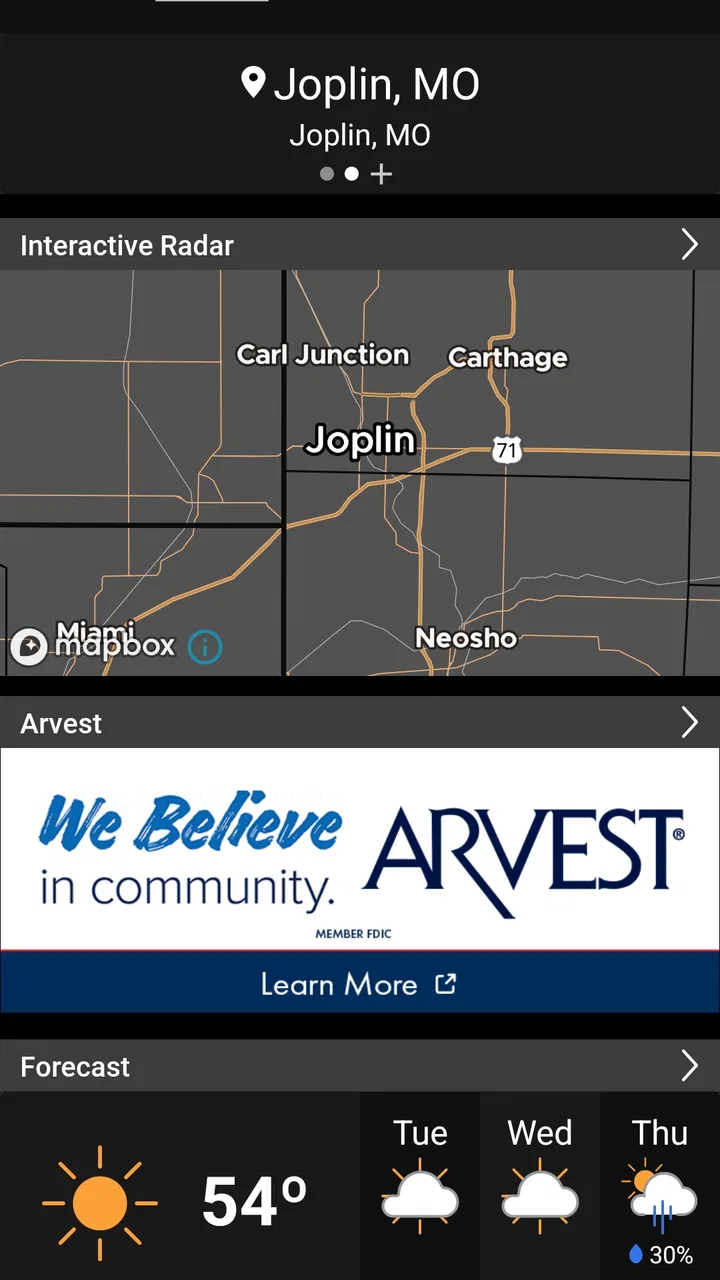
Weather apps often win me over in the first few minutes and then disappear from my daily routine. Doug Heady Weather has a better chance of lasting because it focuses on the information people in the Four State area actually check: radar, alerts, video updates, and forecasts. I found it most useful when I wanted a quick local read rather than a wall of worldwide weather data.
This is a free weather app from Doug Heady Weather, rated for Everyone. It has a 4.6 average from around 40 ratings, with more than 10K installs, so it is a smaller regional tool rather than a giant general-purpose platform. That smaller focus matters. The experience feels aimed at people who want familiar local coverage and a practical way to keep an eye on changing conditions.
What makes the first week appealing
During my first week with Doug Heady Weather, the strongest impression was how naturally it fit into short checking sessions. I could open it when leaving home, look at the forecast, switch to radar when rain seemed possible, and use an alert or video update when the situation deserved more attention. That sequence is more useful than simply reading a temperature and moving on.
You May Also Like

 Pandora - Music & Podcasts
Pandora’s Music Is Easy to Start, but Harder to Recover
Pandora’s strength is its low-effort path from a seed to a station. Its weak spot is how much confidence it asks you to place in connection, setup, and quiet recovery.

 AccuWeather: Weather Radar
AccuWeather Review: A Quick, Clear Forecast for Everyday Decisions
For everyday plans, the best forecast is the one you can understand quickly. AccuWeather makes rain timing, radar, and local conditions easy to act on, with a few trade-offs.

 Hill Climb Racing
Why Hill Climb Racing Still Turns Crashes Into One More Run
A tiny car, a bumpy hill and one more upgrade: Hill Climb Racing keeps resurfacing because its simple chaos makes every near-miss feel personal.

 AliExpress - Shopping App
AliExpress Makes Global Shopping Feel Personal, but Shoppers Bear the Risk
AliExpress turns a global marketplace into a pocket-sized discovery engine. Its reach is useful, its shopping loop compelling, and its trade-offs easy to miss.

 Lords Mobile: Kingdom Wars
Lords Mobile Is a Kingdom-Building Routine, Not a Quick Match
A case-by-case verdict on the building, battles, device demands, and social commitments that make Lords Mobile rewarding for some players and exhausting for others.

 PDF Scanner app - TapScanner
TapScanner Makes Paperwork Easier to Capture, Check, and Share
TapScanner makes scanning with a phone feel less like a rescue operation and more like a dependable step in getting work done. Its capture tools are useful, though not flawless.
More From Our News Desk
View All News


The app’s main appeal is not novelty. It is the combination of several weather formats in one local destination. A forecast helps with planning, radar helps with what is happening now, alerts help when conditions become important, and video can add context that a row of hourly icons cannot provide. I especially like that distinction because weather decisions are rarely based on one number alone.
A realistic everyday example is a school or work morning when the sky looks harmless but rain may develop later. I would check the forecast before getting dressed, open radar before leaving, and return to the app around lunchtime if the weather pattern looked uncertain. If a local video update explained the timing more clearly, that could save me from repeatedly refreshing a generic forecast page.
The most useful habit is to treat the app as a decision tool, not a background decoration. Instead of opening it only to see whether it is hot or cold, I would use the forecast for planning, radar for timing, and alerts for situations that could affect travel or outdoor plans. That makes the app feel more valuable after the initial curiosity wears off.
The current version is 6.7.1.5, and the app supports Android 7.0 or later. That broad compatibility is helpful for people who keep an older phone as a backup or do not upgrade frequently. I would still keep the app updated when possible, because weather tools depend on timely information and reliable notifications more than many casual apps do.
Radar is where the routine becomes practical
Radar is often the feature that determines whether a weather app earns a place on my home screen. Forecast icons tell me what may happen over a period of time, but radar answers a more immediate question: is the weather moving toward me, away from me, or missing my area? Doug Heady Weather puts that kind of short-term checking alongside its other local tools.
One useful workflow is to check radar before starting a drive rather than waiting for rain to begin. I would not treat a clear-looking radar image as a guarantee of safe travel, but it can help me decide whether to leave now, wait a little, or take an umbrella. The trade-off is that radar requires interpretation. Someone who wants a single automatic answer may find it less convenient than a simple forecast card.
Radar is also valuable for outdoor plans that are easy to postpone but difficult to interrupt. Walking the dog, mowing, attending a local event, or taking children to a park all benefit from knowing whether a shower is approaching. In those moments, the app’s regional focus is more useful than browsing a broad national weather service with extra information I will not use.
Alerts and video serve different kinds of attention
Alerts are for moments when I do not want to keep checking manually. They can make the app useful even when I have not opened it recently, particularly during changing conditions. At the same time, I would not rely on alerts as my only safety measure. A notification can be delayed, overlooked, or misunderstood, so serious weather decisions still deserve attention to official guidance and the situation outside.
Video is a different strength. A local presenter can explain why the forecast changed or what a developing system may mean for nearby communities. That context is often easier to understand than a technical chart. The drawback is that video takes more time than glancing at a forecast, and not every user wants commentary when they only need a departure-time check.
For me, the best balance is to use video when the weather is uncertain and the forecast when the day is routine. That prevents the app from becoming a time sink. I would not watch every update automatically; I would choose the videos that answer a specific question, such as whether a storm is likely to affect a planned trip or whether a temperature change will last.
What remains useful after the novelty fades
After the first week, the app’s lasting value depends on repetition. Weather is naturally recurring, so a regional app does not need to entertain me to remain useful. It needs to answer the same practical questions consistently: what should I expect today, what is approaching now, and is there anything important enough to change my plans?
Doug Heady Weather has a sensible place in a monthly routine because its tools cover different time horizons. The forecast supports planning ahead, radar supports immediate decisions, alerts support passive awareness, and video supports interpretation. I would not use each part every day, but that is not a weakness. A good weather app should be useful in different ways depending on the day.
On a normal week, I might open it briefly before work and again before an evening activity. On a stormier week, radar and alerts would become more important. During a stable stretch, the forecast might be all I need. That flexible pattern is one reason I think the app can survive beyond its first impression.
The app is also a good fit for households where weather information is shared informally. One person can check the forecast before a commute, another can look at radar before an outdoor chore, and someone else can use a video update to understand a changing pattern. It does not need to replace every other source to be useful; it can become the household’s quick local reference.
How it compares with common alternatives
Compared with a phone’s built-in weather panel, Doug Heady Weather offers a more local-news-style experience through its combination of radar, alerts, video, and forecasts. A built-in widget is faster for a temperature glance, so I would keep using one for that narrow purpose. But when I need context or want to investigate a change, the dedicated app is more useful.
Compared with a large national weather app, the advantage here is focus. National services often provide more locations, broader maps, and many configuration choices. That can be better for frequent travelers or users who track weather in several regions. For someone mainly concerned with the Four State area, however, a regional presentation may reduce the effort needed to find relevant information.
Compared with a browser search, the app is more convenient for repeated checks because the weather tools are gathered in one place. A search engine can answer a quick question, but it may not give the same sense of continuity between forecast, radar, video, and alerts. The trade-off is that installing another dedicated app adds one more place to maintain and one more notification source to manage.
Compared with a specialist radar app, this app appears better suited to everyday users who want radar as part of a broader local weather experience. A dedicated radar tool may be preferable for someone who studies storm movement closely or wants highly technical map controls. I would choose Doug Heady Weather for practical household planning, not as my sole instrument for advanced weather analysis.
The maintenance burden is modest, but not zero
Weather apps are easy to ignore when conditions are calm, which means their maintenance matters. I would check that notifications remain enabled if alerts are important to me, make sure the app is updated, and occasionally review whether the forecast location is still correct. These are small tasks, but an app that is never opened or configured can quietly lose its value.
I would also avoid allowing every available notification to compete for attention. Alerts are most useful when they remain meaningful. If routine updates become noise, I am more likely to dismiss the important one later. My approach would be to keep safety-relevant alerts active and use video or regular forecast checks when I want more detail.
Another practical habit is to open the app before a day when weather could affect plans, rather than waiting for an alert to make the decision for me. That gives me time to compare the forecast with radar and decide whether I need different clothing, extra travel time, or a backup plan. The app supports that workflow, but it cannot create the habit on my behalf.
Where fatigue can set in
The same local focus that makes the app approachable can feel limiting for people who want a highly customizable weather workstation. If I were traveling often, comparing many cities, or studying detailed weather patterns, I might prefer a larger service with more extensive mapping and location tools. Doug Heady Weather makes more sense when local relevance matters more than maximum breadth.
Video can also become tiring if I only want a two-second answer. A spoken explanation is valuable when conditions are complicated, but unnecessary when I am simply deciding whether to take a jacket. The solution is to use video selectively rather than treating it as the default way to consume every update.
Alerts require similar discipline. They can reduce the need to check manually, but too many notifications can make the app feel intrusive. I would not judge the whole experience by the number of alerts I receive on a quiet day, nor would I assume that an alert removes the need for personal judgment during serious weather.
The smaller user base may also influence how familiar the app feels compared with mainstream alternatives. With an average of 4.6 and 17 written reviews, it has positive early feedback, but I would still evaluate it based on how well its local information fits my routine rather than choosing it solely because of the rating. A regional app has to be personally relevant to earn regular use.
Who should install it, and who should skip it
I would recommend it to people in the Four State area who want local forecasts, radar, alerts, and video in one free app. It is particularly suitable for commuters, families, outdoor workers, dog owners, and anyone whose plans change quickly with rain or storms. The Everyone content rating also makes it an easy household recommendation from an age-classification standpoint.
I would be more cautious about recommending it to travelers, professional weather watchers, and people who need extensive international or multi-city tracking. They may outgrow its regional emphasis or prefer a more technical alternative. I would also skip it if I only want a tiny home-screen temperature display and have no interest in radar, alerts, or local video.
Before committing to it as my only weather source, I would test it across several normal days and at least one period of changing conditions. I would check whether the forecast format is quick enough for mornings, whether radar is understandable, and whether alerts arrive in a useful way. That short trial reveals more than the initial installation because the app’s value depends on repeated use.
My long-term verdict
Doug Heady Weather earns lasting space when I use it as a local weather companion rather than another app to browse aimlessly. Its strongest case is the practical combination of forecast, radar, alerts, and video, especially for people who care about the Four State area. The free price removes the biggest barrier to trying it, while support for Android 7.0 or later makes it accessible on many devices.
It is not the right answer for every weather habit. A built-in widget is quicker for a glance, a national service may be better for broad travel, and a specialist radar tool may suit technical users. Those alternatives are not failures of this app; they simply serve different levels of detail and different routines.
For my own use, the deciding factor would be whether the local presentation keeps helping me make small decisions: when to leave, whether to postpone an outdoor task, and whether a changing forecast deserves closer attention. If I configure alerts carefully and use video only when it adds context, the app avoids becoming noisy. Its long-term strength is recurring usefulness, not novelty.
With its 6.7.1.5 release and regional focus, I see it as a sensible choice for Android users who want more than a basic temperature card but less complexity than a professional weather platform. I would install it for local awareness, keep a broader service available when traveling, and let the app prove its value through everyday decisions. That is a realistic role, and in that role, it is easy for me to recommend.
FAQs for Doug Heady Weather
01What features does the Doug Heady Weather app offer?
The Doug Heady Weather app provides real-time weather updates, detailed forecasts, radar imagery, and severe weather alerts. It also features personalized settings to tailor notifications to your location. Users can access hourly, daily, and weekly forecasts, making it a comprehensive tool for staying informed about weather conditions.
02Is the Doug Heady Weather app free to use?
Yes, the Doug Heady Weather app is free to download and use, offering a wide range of features without any cost. However, some advanced features or ad-free experiences may require in-app purchases or subscriptions. Check the app store for detailed pricing information and available options.
03How accurate are the forecasts provided by the Doug Heady Weather app?
The Doug Heady Weather app utilizes advanced meteorological data and technology to provide highly accurate forecasts. It sources information from reliable weather services, ensuring users receive precise weather updates. However, like any weather app, occasional discrepancies may occur due to rapidly changing weather conditions.
04Does the app provide severe weather alerts?
Yes, the Doug Heady Weather app offers severe weather alerts to keep users informed of any potential threats. These alerts are customizable, allowing you to set notifications for specific weather conditions, ensuring you receive timely updates to stay safe during severe weather events.
05Can I customize the settings in the Doug Heady Weather app?
Absolutely, the Doug Heady Weather app provides a variety of customizable settings. Users can adjust notification preferences, choose their preferred units of measurement, and select specific locations for weather updates. This flexibility allows users to personalize their weather experience according to their needs.
Pros
- Accurate local weather forecasts.
- User-friendly interface design.
- Real-time weather alerts.
- Detailed radar imagery available.
- Customizable notification settings.
Cons
- Limited international coverage.
- Occasional ad interruptions.
- Requires internet connection.
- Some features need premium access.
- Battery usage can be high.

Doug Heady Weather
Gallery